Monday, July 13, 2015

Find Serial Key Of Any Software

Find Serial Key Of Any Software
SOURCE: http://www.techews.com/find-serial-key-of-any-software/#
Most of you download and use pirated software from torrents or any such other sites, but sometime it gets very difficult to find serial key of those softwares. I will make it easy for you by showing you simple yet very intersting google trick which will allow you to find serial key of any software very easily.

How To Find Serial Key Of Any Software ?

The key 94FBR is a part of  Office 2000 Pro CD activation key that is widely distributed as it bypasses the activation requirements of Office 2000 Pro. By searching for 94fbrand the product name, you are guarantee that the pages that are returned are pages dealing specifically with the product you’re wanting a serial for. Follow simple steps given below to learn this trick
  1. Go to Google
  2. Then type  Software Name 94FBR
  • Replace Software Name with the name of software whose serial key you want to find
  • Eg: To find serial key of Nero 10  type Nero 10 94fbr
  1. Now press Enter and you will find serial key of software you are looking for as shown below.Find Serial Key Of Any Software

Friday, July 10, 2015

Cách pha các loại nước chấm ngon và đơn giản nhất

Cách pha các loại nước chấm ngon và đơn giản nhất


source: http://emdep.vn/meo-lam-bep/cach-pha-cac-loai-nuoc-cham-ngon-va-don-gian-nhat-20150709125324891.htm

Rất nhiều các món ăn ngon hay không một phần là do nước chấm ăn kèm, cùng học cách pha vài loại nước chấm ngon cho các món ăn thông thường hàng ngày nhé.
    Cách pha các loại nước chấm ngon và đơn giản nhất

    Cách pha nước chấm nem rán truyền thống

    Nguyên liệu:
    + Nước mắm ngon: 50ml
    + Đường: 35g
    + Dấm: 80ml
    + Nước lọc: 50ml
    + Đu đủ xanh, cà rốt: 200g
    + Ớt tươi, tỏi, hạt tiêu, muối hạt tùy thích
    Cách làm:
    Cách pha các loại nước chấm ngon và đơn giản nhất
    - Đu đủ xanh, cà rốt sơ chế sạch, thái miếng vừa ăn. Các bạn có thể tỉa hoa theo ý thích sẽ làm bát nước chấm đẹp mắt hơn rất nhiều. Ướp đu đủ, cà rốt đã thái miếng với 1 thìa cà phê muối hạt trong 15 phút cho ra bớt nước rồi rửa lại thật sạch bằng nước đun sôi để nguội. Vắt khô đu đủ và cà rốt rồi trộn với 30ml dấm gạo và 5g đường để đu đủ cà rốt ngấm dấm đường trong vòng 15 phút.
    Cách pha các loại nước chấm ngon và đơn giản nhất
    - Tỏi bóc vỏ đập dập, băm nhỏ. Ớt tươi cắt lát, bỏ hạt. Cho nước mắm, nước lọc toàn bộ phần dấm gạo và đường còn lại vào tô to, khuấy đều cho tan hết đường. Thả đu đủ, cà rốt đã ngâm dấm đường vào bát nước chấm và nêm nếm lại cho vừa với khẩu vị gia đình.
    Cách pha các loại nước chấm ngon và đơn giản nhất
    Cuối cùng các bạn cho tỏi ớt  băm nhỏ vào và rắc thêm chút hạt tiêu xay là đã có ngay 1 bát nước chấm nem kiểu truyền thống với đủ vị chua cay mặn ngọt ngon tuyệt rồi đấy nhé.

    Cách làm muối chấm chanh chấm thịt gà, thịt heo luộc

    Nguyên liệu:
    + Gia vị /chẩm chéo: 2 thìa cà phê
    + Chanh tươi: 1 quả
    + Lá chanh, ớt tươi, hạt tiêu tùy thích
    Cách làm:
    Cách pha các loại nước chấm ngon và đơn giản nhất
    - Lá chanh rửa sạch, để ráo nước, thái thành sợi nhỏ. Ớt cắt lát xéo. Chanh tươi bổ đôi, dùng dao nhọn tỉa răng cưa vòng quanh cho đẹp.
    Cách pha các loại nước chấm ngon và đơn giản nhất
    - Cho gia vị, hạt tiêu, lá chanh thái chỉ, ớt tươi cắt lát vào bát, thêm chanh tươi vào là có bát muối tiêu chấm thịt gà luộc ngon tuyệt. Thay gia vị bằng chẩm chéo thêm chanh ớt, các bạn sẽ có đồ chấm cho các món thịt luộc, cá nướng hoặc hải sản hấp cực kỳ hấp dẫn mà lạ miệng nhé.
    Cách pha các loại nước chấm ngon và đơn giản nhất

    Cách pha mắm tôm ngon cho món bún đậu tuyệt hảo

    Nguyên liệu:
    + Mắm tôm ngon: 50g
    + Rượu nếp: 10ml
    + Đường: 2 thìa cà phê
    + Chanh: 1 quả to
    + Dầu ăn: 1 thìa canh
    + Ớt tươi tùy thích
    Cách làm:
    Cách pha các loại nước chấm ngon và đơn giản nhất
    - Cho mắm tôm, rượu nếp, đường vào bát vừa ăn, khuấy đều để mắm tôm quyện với rượu nếp và tan hết đường. Chanh hoặc quất vắt lấy nước, lọc qua dây bỏ hạt cho vào bát mắm tôm. Dầu ăn, nếu rán đậu các bạn có thể dùng luôn 1 thìa dầu trong chảo rán còn nếu không, các bạn cho dầu ăn vào bát quay trong lò vi sóng chừng 5 giây cho nóng già thì cho vào bát mắm tôm.
    Cách pha các loại nước chấm ngon và đơn giản nhất
    Dùng đũa đánh đều nhẹ nhàng bát mắm tôm để mắm sủi bọt và bông đều, thêm ớt tươi cắt lát cho phù hợp với khẩu vị của gia đình.
    Chúc các bạn thành công với cách pha các loại nước chấm rất đơn giản này nhé.

    Thursday, July 9, 2015

    Lưu ý cực kỳ quan trọng đối với những ai có thẻ định cư lâu dài và định cư tạm thời

    Lưu ý cực kỳ quan trọng đối với những ai có thẻ định cư lâu dài và định cư tạm thời


    Source: http://donghuonggroup.ru/vi/tin-tuc-va-su-kien.nd4/luu-y-cuc-ky-quan-trong-doi-voi-nhung-ai-co-the-dinh-cu-va-dinh-cu-tam-thoi.i118.html

    Như các anh chị đã biết, những người có thẻ định cư lâu dài (ВИД - вид на жительство), đều biết rằng để được nó trong tay, đấy là một quà trình lâu dài, tốn công, tốn sức và tài chính. Vậy khi có nó rồi chúng ta phải có trách nhiệm giữ nó, bảo toàn nó và phát huy thế mạnh của nó.

    Tình hình quản lý người nước ngoài càng ngày càng chặt chẽ, có nghĩa là luật sẽ được thực hành nghiêm minh hơn. Trong thời gian gần đây rất nhiều trường hợp không gia hạn được ВИД hoặc từ định cư tạm thời (РВП - разрешение на временное проживание) không chuyển lên được định cư lâu dài, chỉ vì chúng ta quên trình diện hàng năm.

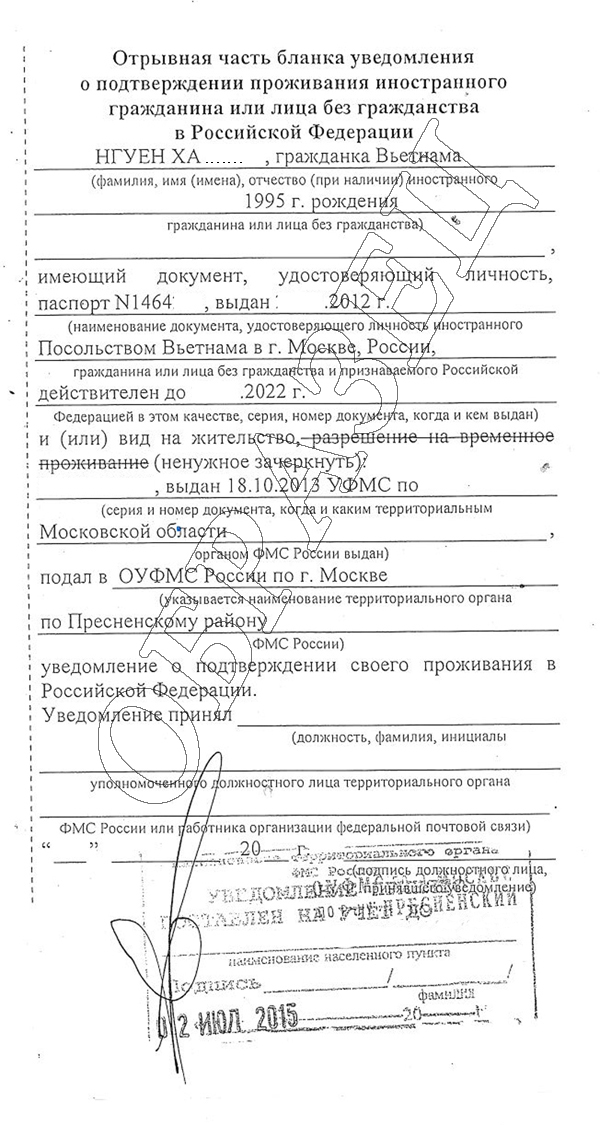
    Trình diện hàng năm (ежегодное уведомление о потверждении проживания иностранного гражданина или без гражданства в Россиской Федерации) là khẳng định sự sống, sự có mặt của mình ở Nga. 


    Theo kinh nghiệm làm việc của Đồng Hương Group thì hầu như bà con quên không làm, thậm chí có người đã không làm trong cả một thời gian dài 2-5 năm. Hậu quả là không làm được định cư lâu dài (ВИД) đối với những ai đã có thẻ định cư tạm thời (РВП) hoặc là không gia hạn được thẻ định cư (ВИД) đối với những ai đã có nó. Một số trường hợp đã bị hủy thẻ định cư, cho trục xuất tự nguyện và 5 năm sau mới được vào lại Nga. Chính vì vậy, Đồng Hương Group khuyên các bạn hãy quan tâm đến tình trạng giấy tờ của mình, quan tâm đến luật lệ di trú hơn nữa, phải nhận thức rằng không ai quan tâm số phận của mình bằng chính mình.
    Những ai cần phải trình diện hàng năm? : Những người đã có quyền định cư lâu dài (вид на жительство - ВИД) và quyền định cư tạm thời 3 năm (разрешение на временное проживание - РВП).
    Thời gian để trình diện được tính từ khi nào? : 
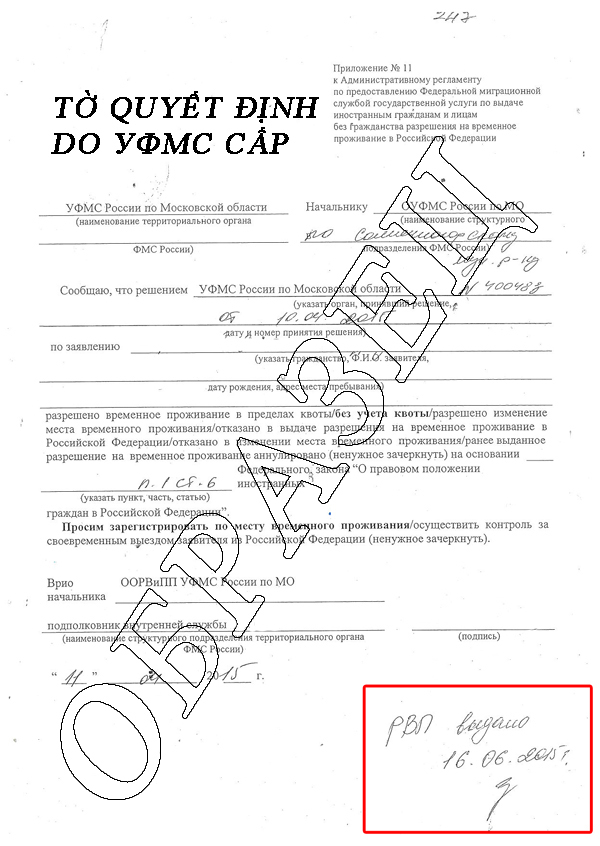
    + Đối với những ai có РВП thì thời gian trình diện được tính là từ ngày cuối cùng của tháng thứ 12 đến hết tháng thứ 14 kể từ ngày cấp thẻ định cư tạm thời (выдачи РВП) trên tờ quyết định do УФМС cấp (có nghĩa là có 60 ngày để làm).
     

    + Đối với những ai đã có ВИД thì thời gian trình diện được tính là từ ngày cuối cùng của tháng thứ 12 đến hết tháng thứ 14 kể từ ngày cấp ВИД (có nghĩa là có 60 ngày để làm).
     

    Trình diện ở đâu? :
    Trình diện tại phòng ngoại kiều của phường (отдел УФМС по району .... ) theo địa chỉ đăng ký hộ khẩu trong thẻ định cư (dài hạn hoặc tạm thời)
    Những giấy tờ cần thiết để trình diện? :
    - Tờ khai theo mẫu
    - Giấy chứng nhận thu nhập một năm vừa qua (chứng nhận trả thuế, bảng lương, chúng nhận tài khoản có đủ tiền cần thiết ở nhà bank,…)
    - Copy giấy tờ tùy thân (hộ chiều, ВИД)
    - Tờ trình diện năm trước (nếu có)
    Những lý do không trình diện được? :
    1) Không có địa chỉ đăng ký cố định hoặc đăng ký một nơi, ở một nơi.
    2) Quá 14 tháng (giới hạn cho phép trình diện).
    3) Không chứng minh được thu nhập bảo đảm sự tồn tại tối thiểu của mình.
    4) Đang ở nước ngoài trong thời gian trình diện (12-14 tháng).
    Trong trường hợp nếu như đã bị vi phạm thì hãy cẩn thận tìm lý do để giải trình cho cơ quan di trú tránh bị ra tòa vì hấu hết 95% sẽ bị tòa xử cho về nước, 5 năm sau không quay được vào Nga hoặc là hãy đến với Đồng Hương Group nhận sự tư vấn để hoàn thiện, củng cố và phát triển tiếp lịch sử di trú của bạn ở Nga.

    Wednesday, July 8, 2015

    The Potential Of Beacon Technology

    The Potential Of Beacon Technology
    Source: http://techcrunch.com/2014/11/01/unlocking-the-potential-of-beacon-technology/
    After indoor positioning with Wi-Fi, beacon technology is a massive step forward in ambient context identification, which is why this technology is all the buzz of late. Beacons allow for background positioning and detection, giving new power to a phone that can make it truly “smart.”
    Because they offer the potential to target a consumer at the most opportune moment, beacons are especially hot on the retail sales front because shelves and store displays can suddenly become interactive and personalized. Brands are no longer limited by shelf displays and point-of-sale campaigns to communicate their messages, and brand marketers can extend past the store floor or shelf to deliver a personalized, digital form of outreach to identified shoppers.
    Beacons are a unique and sophisticated tool in the world of merchandising and advertising. However, if we take a step back and think about exactly how beacons are reaching retail locations, there is reason for concern rather than excitement.
    Currently, beacon networks are fragmented and closed. At quick glance, this may not be a concern, but thinking ahead, this fragmentation will likely result in long-term negative implications for consumers, retailers and developers alike.
    An analogy for beacon technology is GPS. Since its inception, GPS technology has always been an “open system” onto which developers could innovate and extend new product applications. Imagine if GPS had been deployed in a similar manner to beacons and, for example, if Google seized control of California, Apple secured rights to Nevada, and TomTom gained exclusive access to The Netherlands. In this situation, the end-user would be forced to rely on multiple applications and hardware selections to complete a single journey.
    Fortunately, GPS was not deployed in this fashion. But this is exactly how beacons are currently being deployed, and it’s the primary reason why they will limit the same innovation and depth of user experience that everyone is getting excited about.
    To unlock the massive potential of beacons, we need an open network much like GPS: ubiquitous, widely accessible, and easy to use and implement through built-in platform support. Beacons must form a new ubiquitous layer that powers context in order to most effectively serve the end-user. Instead, individual companies are currently creating the equivalent of small, private networks that will have limited value and use.
    In the retail space, beacons have garnered considerable attention in recent weeks and months. It is our view that if we advocate and build an open, inclusive beacon network, then all constituents — retailers, developers and end users — will collectively benefit.

    Retailers

    As with any new space, “immediate gain” usually does not translate to “ultimate reward.” It is likely that the retailers currently teaming up with closed networks may find themselves rethinking this decision a few years down the line.
    We’ve all read about retailers aligning with various app developers to install beacons for their apps. But today’s hot app may not be the most popular tomorrow. If a retailer ties itself to a platform backed by a single app and that app slips from hot to “not,” then that retailer is faced with having to uninstall and reinstall beacons. This reconfiguring process requires a massive undertaking in order to take advantage of new technological advancements. And the consequences are not without impact to the merchant’s bottom line.
    By forgoing closed networks and advocating for an open platform, retailers stand to significantly gain from future developments by retaining the ability to employ newer innovative services as they emerge and gain mass acceptance.

    Developers

    Imagine that GPS was closed and that only one developer could access this data. If this had been the case, innovation would have been extremely limited. As it currently stands, beacon developers have to pay-to-play by teaming up with retailers to install beacons at retail locations or small proprietary networks. This is cost-prohibitive for small companies and startups.
    Additionally, without an open network, a developer is forced to spend unnecessary time attempting to access the network instead of building an incredible service and pushing the envelope on potentially more progressive offerings. If Waze had to do that for location data, it probably never would have been built.
    The fact that we don’t have an open system for beacons will most likely stifle innovation, which ultimately will hurt all constituents involved.

    End-users

    In the early stages of any technology, developers need to be cognizant of long-term repercussions. Under the current paradigm, for a shopper to realize the full benefits of beacon technology, that user would have to download a multitude of apps that each take advantage of only a small network of beacons. This is highly unrealistic. Users don’t want to download apps for every retailer because it’s cumbersome, time-consuming and ineffective.
    An open, accessible and ubiquitous network would benefit all constituents, propel innovation and foster a collaborative environment for decades to come.

    Tuesday, July 7, 2015

    «Хаос-контроль» — простой способ взять жизнь в свои руки

    «Хаос-контроль» — простой способ взять жизнь в свои руки

    Лидия Балашова
    Никто не любит трудности. Часто нам проще отказаться от выполнения чего-то сложного и продолжительного, пусть и сулящего выгоды. Против нас играет и ритм жизни: ежеминутно к списку текущих дел добавляются новые и новые. Контролировать всё это помогают различные органайзеры и менеджеры задач. Сегодня мы расскажем об одном из них, на редкость простом, понятном и удобном.
    Как взять свою жизнь под контроль и изгнать из неё хаос раз и навсегда
    На рассмотрении у нас менеджер целей и задач «Хаос-контроль». Этот органайзер помогает воплотить в жизнь главный совет гения продуктивности и автора теории Getting Things Done Дэвида Аллена: если информацию можно выгрузить из мозга на внешние носители, это обязательно нужно сделать.
    Принцип работы «Хаос-контроля» сводится к четырём составляющим: постановка целей, разработка плана их выполнения, создание условий для достижения успеха и управление хаосом.
    Допустим, у нас в жизни есть несколько целей. Сразу достичь их сложно, поэтому мы разбиваем весь предстоящий путь на ряд поэтапных задач. Для каждой задачи указываем контекст, при соблюдении которого она может быть выполнена. В течение дня руководствуемся предложенным планом, а все внезапности отправляем в специально отведённое для них хранилище.
    Общий вид План дня
    Да, обратите внимание на оформление версии для Android — Material Design во всей красе.
    Теперь подробнее о том, как здесь всё устроено.

    Проекты и папки

    Проекты — это наши большие цели. Папки — направления, к которым они относятся: работа, личные дела и всё прочее. В каждой папке мы можем создавать как единичные проекты, так и объединять их в подразделы. Для каждого проекта задаётся время начала и окончания работы над ним.

    Задачи

    Так в системе «Хаос-контроля» называются шаги, которые мы должны предпринять для воплощения задуманного в жизнь. Эти действия могут быть одиночными или обитать в рамках проектов. Каждой задаче присваивается контекст — некое условие, при выполнении которого она осуществляется. Есть возможность установить несколько напоминалок, которые не дадут забыть о том, что нужно сделать.

    Контексты

    Ими могут быть как места, так и люди. Например, если речь идёт о совещании, понятно, что провести его можно только на работе, причём желательно присутствие коллег. «Хаос-контроль» предлагает несколько стандартных вариантов («В офисе», «В сети», «Дома», «С утра» и «Когда есть свободные 15 минут»), пользователи могут добавлять и свои. Здесь обнаружился единственный недостаток приложения — задача ассоциируется только с одним контекстом, а всё остальное приходится писать в примечаниях.

    Место Хаоса

    Своего рода чистилище для всей поступающей информации. Сюда можно сбрасывать внезапные идеи, планы и вопросы, которые не требуют срочного решения. Здесь всё это пройдёт испытание временем, после чего приобретёт вид задачи или проекта, а если нет — что ж, отправится в небытие.
    Место Хаоса Виджеты
    У «Хаос-контроля» есть два виджета, с помощью которых можно перейти как к сегодняшним задачам, так и к хранилищу пока что невостребованной информации. Очень удобно, кстати, что доступ к нему можно вынести на рабочий стол: так пользователь точно не забудет, что «Место Хаоса» надо всё-таки иногда приводить в порядок.
    Впечатления от приложения остались самые приятные. Всё предельно просто и понятно, есть напоминания и возможность индивидуальной настройки. Больше от менеджера задач ничего и не нужно. Если всё-таки базовая версия не вполне устраивает, добро пожаловать в «Хаос-контроль Premium»: синхронизация данных между мобильными и настольными устройствами, облачное хранение всех данных, повторяющиеся задачи для регулярных дел, вложенные папки и контексты, а также защита информации с помощью PIN-кода. Кажется, придумать что-то ещё сложно, да и вряд ли нужно.
    Source: http://lifehacker.ru/2015/07/01/chaos-control/

    How to Send SMS Messages From Any PC or Mac

    How to Send SMS Messages From Any PC or Mac

    Teenager Addicted To The Internet And Social Media Using Phone And Laptop At The Same Time
    Why type out text messages at your smartphone when you’re at a laptop or desktop PC with a full-size keyboards? These tricks allow you to send text messages directly from your PC.
    Even if you don’t have access to cellular service you can use some of these tools to send SMS messages directly to a phone number. You don’t even need a mobile phone on your end.

    Messages for iPhones – Mac Only

    RELATED ARTICLE
    How to Make Macs and iOS Devices Work Together Seamlessly with Continuity
    Continuity is a new set of features that allow Apple device owners (iPhone, iPad, iPod Touch, Mac) to instantly and effortlessly transfer... [Read Article]
    If you have both an iPhone and a Mac, Apple makes this possible. You need both — there’s no way to do this with an iPhone and a Windows PC. The built-in SMS-message-sending feature on a Mac only works if you partner it with an iPhone, too — not if you have an Android phone.
    This is part of the “Continuity” feature added in Mac OS X 10.10 Yosemite. You’ll need to enable it on your iPhone by opening the Settings app, tapping Messages, and activating Text Message Forwarding to your Mac. It should then work automatically if you’re using the same Apple ID to log into both your iPhone and your Mac. Open the Messages app on your Mac and you’ll see a synced history of text messages from your iPhone, too. You can reply from your Mac or send entirely new messages from the Messages app. Those text messages will be synced to your iPhone, too.
    This doesn’t cost anything extra — it just uses your iPhone’s text-messaging service. If your cellular carrier charges you for texts, you’ll have to pay that fee for the messages you send.

    MightyText for Android Phones

    RELATED ARTICLE
    How To Send Text Messages From Your PC With Your Android Phone
    You’re sitting at your PC and you receive a text message, so you pick up your phone, unlock it, read... [Read Article]
    if you have an Android phone, the best way to do this is MightyText. MightyText is an app you install on your Android phone. You can then sign into the MightyText web app in a web browser on your computer — any computer, whether it’s running Windows, Mac OS X, Linux, or Chrome OS — and you can view and send your phone’s text messages from there. Browser extensions are also available. The AirDroid app for Android also does this and works well.
    Like Messages on a Mac, this works entirely through your phone — your computer just becomes a gateway to your phone, which does the hard work of actually sending and receiving those text messages.
    This won’t cost you anything extra. If your cellular carrier charges you for text messages, you’ll have to pay their fee.

    Google Voice – US Only

    RELATED ARTICLE
    8 Reasons You Should Be Using Google Voice (If You’re American)
    Google Voice has been out for years, but many people in the US still haven’t given it a try. Google... [Read Article]
    Google Voice is still around, but it’s also still only available to people based in the USA. If you are based in the USA, you can sign up for Google Voice for free. Google Voice gives you a new phone number, which you could use as your primary phone number if you like — although it’s unclear how long Google Voice will continue to be a service supported by Google.
    Sign into the Google Voice website and you can send and receive text messages at that phone number. You can also have calls and text messages sent to that phone number be automatically forwarded to your primary phone number.
    Sending text messages and placing phone calls to numbers in the US and Canada is completely free with Google Voice. You’ll have to pay Google to send text messages elsewhere.

    Skype

    Skype offers the ability to send text messages from the Skype desktop app. Unlike Google Voice, this is available worldwide. However, Microsoft does charge for this service, so you’ll have to pay to send text messages from Skype.
    Pay for credit and you can send and receive text messages directly from Skype. However, these won’t sync with the text-message app on your smartphone. People won’t be able to respond directly to these messages, but you can set up sender ID to have the messages displayed as coming from your mobile number. if you do, people who respond will be texting you on your phone — but those messages won’t appear in the Skype app for desktop.

    Email-to-SMS Gateways

    Many cellular carriers offer email-to-SMS gateways you can use. Send an email to the phone number at this gateway and it will be delivered to the address. You will need to know the carrier associated with the phone number to send an SMS message in this way.
    For example, let’s say a person’s phone number is 1-123-456-7890 and that’s a T-Mobile phone number. You could send an an email to 11234567890@tmomail.net. Search for “email to SMS gateways” to find lists of gateways for different cellular service providers. For example, this email-to-SMS gateway list includes different email address for many different cellular carriers around the world.
    Be sure to keep your message short — under 160 characters.

    There are also a variety of websites you can use to send text messages for free. These aren’t for carrying on ongoing conversations — they’re just for sending a quick, one-off message to a phone number.
    Such websites don’t always seem the most trustworthy and may ask for an email address before you continue, perhaps to send you spam. These are really only ideal as a last resort.

    Source: http://www.howtogeek.com/221476/how-to-send-sms-messages-from-any-pc-or-mac/